Wolf Rock Tech Labs

Working demonstrators

Things we built to show how we work: real, running examples on fictional or sandbox data. None is a client deployment or a product for sale.

Looking for our AI governance demonstrators (ImpactIQ, SupplierIQ and GovernIQ)? They sit with our consultancy work. See them under Work.

The demonstrators

Working demonstrator Control evidence Security assurance

Control Evidence: from screenshots to re-verifiable checks

The idea A portfolio prototype that pulls live evidence from five sandbox or project systems and maps findings to selected control IDs. It makes gaps visible and lets a reviewer re-check the underlying state.
Show the full caseHide the full case

The demonstrator connects to AWS, GitHub, Vercel, Microsoft Entra and Aikido Security. It records scan history, distinguishes passing, failing and unknown checks, and shows how a newly failing check can enter a remediation workflow. Some findings remain deliberately open so the demo does not suggest that every problem has been resolved.

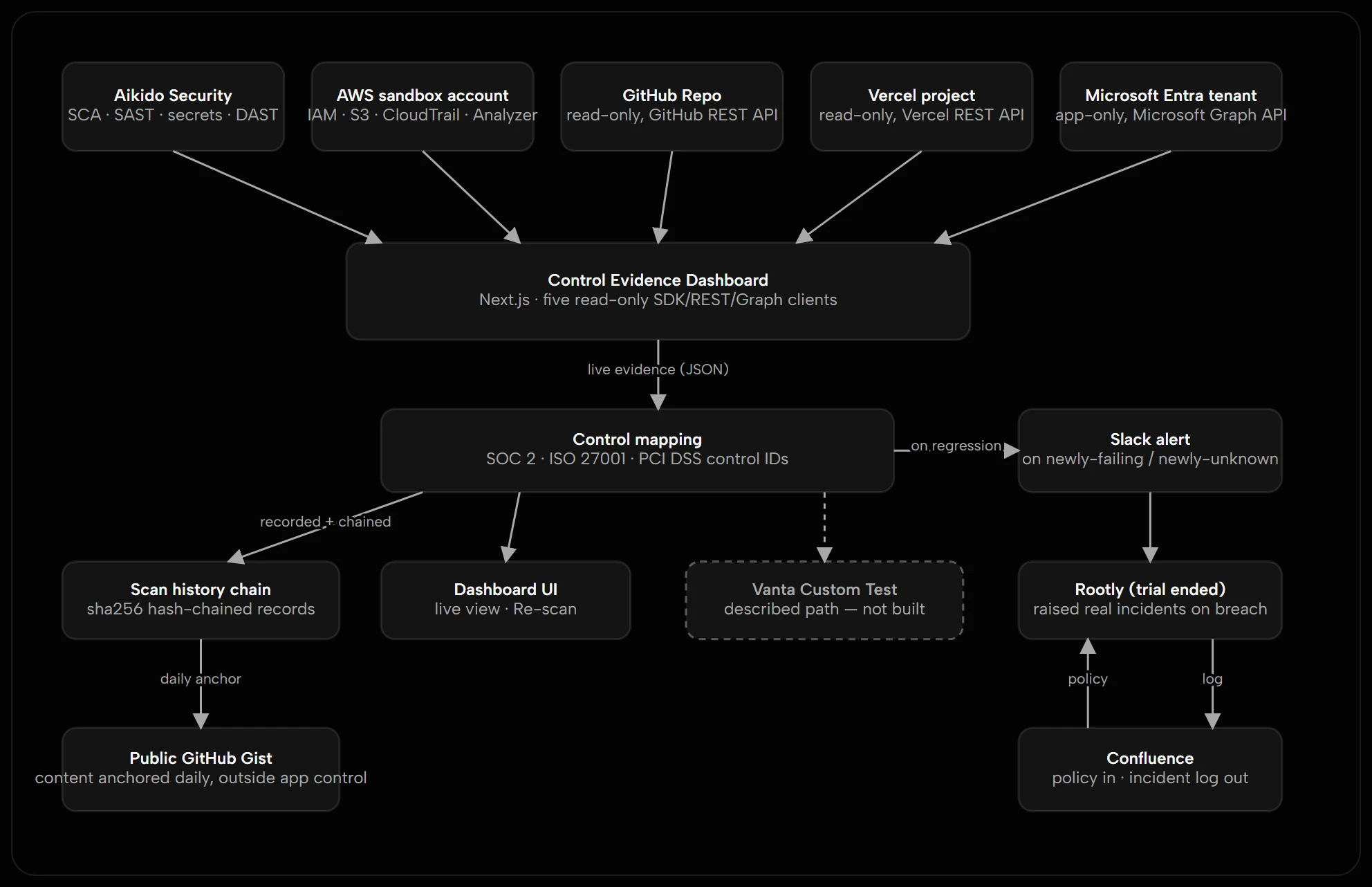
The architecture distinguishes implemented paths from an illustrated future Vanta custom-test integration. This is not a production GRC platform or a substitute for an audit.

Control Evidence dashboard: a strip reading 40 live requests to Aikido, AWS, GitHub, Microsoft and Vercel, then a live posture panel with checks evidenced, passing, gaps and a posture percentage, above a chart of risk posture from 19 August to 23 September.
Every page load runs a live scan of five systems, and posture is tracked over time. Open full-size image ↗
Control mapping for the AWS sandbox: checks such as account password policy, IAM user MFA enforcement and CloudTrail audit logging, each marked pass or fail and tagged with SOC 2, ISO 27001 and PCI DSS control IDs.
Each technical check is mapped to the SOC 2, ISO 27001 and PCI DSS controls it evidences. Open full-size image ↗
Regulatory context panel: checks grouped under DORA Article 9, protection and prevention, and Article 10, detection, each marked pass, fail or unknown, with a note that this is a thematic mapping, not a control equivalence.
The same checks mapped thematically to DORA, with the limits of that mapping stated on screen. Open full-size image ↗
Architecture: five read-only sources, Aikido, AWS, GitHub, Vercel and Microsoft Entra, feed the dashboard and control mapping; scan records are hash-chained and anchored daily to a public gist; regressions alert in Slack; a dashed Vanta custom-test path is marked not built.
The architecture separates evidence collection, audit history and remediation; the dashed Vanta path is not built. Open full-size image ↗
Working demonstrator Service operations Operational resilience

Signal Ledger: one view across service desk, incident and partner signals

The idea A working demonstrator of one architectural pattern: unify the signals from separate operational tools, such as service desk tickets, incidents and partner-raised issues, into one view without replacing any of them.
Show the full caseHide the full case

A connector per tool turns each platform’s records into one shape. Correlation and service-level logic only ever see that shape, so the same problem raised in two tools is linked, with the evidence for why, and service is scored separately for internal, consumer and partner audiences. No blended number hides a weak partner result behind a strong internal one.

Where a model suggests a likely root cause, it is labelled as AI-generated and unverified. The seed data deliberately leaves some signals unlinked, because a tool that links everything is worse than one that does not. A working “Connect a source” form maps a platform’s field names onto the common shape, with templates for ServiceNow, Jira, Zendesk, Freshservice, incident.io and Rootly.

Around that sit the operations views a service review needs, all computed from the invented records: a readiness check for accepting a service into live operation, links from incidents to a recent change with change failure rate and time to restore, a scorecard for invented suppliers, and a one-page review pack that prints to PDF.

This is not an integration with any organisation’s systems, and not a replacement for an ITSM platform. The connect form runs against a mock connector and never contacts a real system. Almost all of the data is invented. A few real records, captured once from sandbox Jira and Rootly accounts, are marked Live and are never correlated with the invented ones.

Signal Ledger queue filtered to the partner audience: four summary counts (31 signals from 6 sources, 5 correlation groups, 15 signals in a group, 16 standalone), a note that 13 real captured records are marked Live, and six rows, each with a source badge, severity, status and a linked-signals chip.
One queue across the service desk, incident platform and partner channel, each signal keeping its source badge. Filtered here to the partner audience. Open full-size image ↗
A correlation group of five signals from the incident platform, partner channel and service desk at 83% confidence, with a suggested root cause labelled AI-generated and unverified, a timeline of when each signal was open, three weighted match features and a pair-by-pair table.
Why signals were grouped: a timeline, three weighted features and every pair, with the suggested cause labelled unverified. Open full-size image ↗
SLA health with three separate scorecards: Internal at 96% against an 85% goal, Consumer at 75% against 90% and Partner at 60% against 95%, each with resolved counts, open-past-target counts and per-severity targets.
Three scorecards for three audiences, never one blended number. Open full-size image ↗
Connect a source form with the ServiceNow template selected, the sample record served by the mock connector, and a field-mapping table that reads each mapped path against the sample.
Connecting a tool means mapping its fields onto one shape, each path read against a sample record live. It runs against a mock connector. Open full-size image ↗
Service readiness: a summary of 5 ready, 2 conditional and 3 not ready of 10 invented services, the rule that works out each status from nine checklist items, and a table of services with owner team, go-live date, computed readiness and incidents since go-live.
Readiness for accepting a service into live operation. Each invented service is scored from a nine-item checklist by a visible rule, with early-life incidents counted against it. Open full-size image ↗
The Suppliers tab on SLA health: three invented suppliers with signals, SLA breaches, mean restore time and correlation groups, and an overnight settlement batch table showing which runs breached their completion target.
Invented suppliers held to account for SLA breaches, and an overnight batch that missed its completion target on 3 of 7 runs. Open full-size image ↗
Working demonstrator AI-assisted workflow and tool delivery Fractional technology governance leadership

A membership and events setup in HubSpot: built with AI in two days, then tested for what breaks

The idea A fictional member organisation has to track renewals, take event registrations and follow up without anyone doing it by hand. We built that in HubSpot with an AI assistant in about two days, using invented data throughout.
Show the full caseHide the full case

Building was the quick part. The useful result was what testing found: a default setting that quietly polluted the data, an automation that reported success while the email never arrived, and records that nobody owned.

The setup is a fictional member organisation with three membership programmes across five regions: 50 member companies, 120 contacts and 12 renewal deals worth £349,000 in total.

What it does

  • Tracks members and renewals: each member has a programme, region, tier, fee, renewal date and last engagement date. A renewals pipeline holds one deal per renewal, so income at risk is visible by stage.
  • Takes registrations: a public event page and form, with a consent checkbox.
  • Automates the follow-up: when someone registers, a workflow sends a confirmation, records the engagement on the person and their company and, if the company renews within 90 days, creates a task for the account owner.
  • Shows the picture: a dashboard with four reports: renewals due, members who have gone quiet, event sign-ups by programme and data quality.
  • Answers questions in plain English: through HubSpot’s official connector, the AI assistant was asked which members renewing next quarter had not engaged for six months. It named two, with £79,000 in fees between them, and the answer matched the dashboard.

Why it is useful

  • It shows where a CRM setup will go wrong before real people depend on it.
  • Failures show up in a log, not on screen, so the log is where to look first.
  • Every gap ends with a question for a named person: who owns this, and who decides?

What went wrong, and what it showed

  • A default setting polluted the data. HubSpot automatically created 50 nameless company records from the contacts’ email domains. They would have appeared in the data-quality report as members with no owner and no region. They were found and removed, and the setting was switched off.
  • The automation succeeded, but the email never arrived. Every step reported success except one, and nothing on screen said so. The log showed “Previously unsubscribed from this subscription type”. The form’s consent checkbox recorded consent for one subscription type, and the email was sent under another. Each looked correct on its own.
  • A business rule could not be written as stated. “Renewal within 90 days” has no direct filter in the workflow tool, which offers calendar periods or fixed dates. A fixed cut-off worked for the sandbox. A real build would use a calculated “days to renewal” property.
  • Ownership was empty for every member. The planned account managers were never real users, so the data-quality check found every company unowned. Nobody owned the data, which is exactly when a CRM stops being trusted.
  • The assistant met real guardrails. Some calls were refused for lack of permission, a deletion was blocked until a person approved it, and a reporting query needed permissions the connection did not have. Each time the work stopped and a person decided.

Building became quick. Ownership, consent settings and data quality did not. They are decisions someone has to make, and no tool makes them.

What it does not do

  • It is a learning sandbox on a trial account. It is not a client system and holds no real members.
  • It does not send anything to real people. Test emails went only to addresses the builder controlled.
  • The 90-day rule is a fixed date, not a rolling one.
  • Event sign-up numbers are tiny because the data is fictional. They show that the plumbing works, not that engagement is good.
  • The software never makes the judgement. People set the rules and approve the actions.

Watch it: a two-minute captioned walkthrough with a voice-over. There is no live app to open, because the sandbox runs on a time-limited trial and will not stay up.

The fictional setup, from registration to the log that showed the failure, to the dashboard. About two minutes, with a voice-over.
Read the transcript

A fictional member organisation needs to track renewals and event registrations without anyone doing it by hand. We built that in HubSpot, with an AI assistant, in about two days. Everything you will see is invented.

Members register on an event page. The form has a consent checkbox. Remember it, because it matters later.

A workflow then sends this confirmation email.

Then we tested it. Every step reported success, except one. The email never sent, and nothing on screen said so. Only the log showed it: previously unsubscribed from this subscription type.

The checkbox and the email used different subscription types. Once we aligned them, the email sent.

Each looked correct on its own. Only the log showed the mismatch.

The dashboard shows renewals due in the next ninety days, by programme, and the members who have gone quiet, ordered by fee.

Data quality is on the same screen. A bar for blank values shows where data is missing. Sign ups are tiny because the data is fictional.

Testing found more. A default setting created fifty nameless company records, which we removed. A renewal rule could not be written as stated. Ownership was empty for every member. And the assistant met real guardrails: each time, a person decided.

Building became quick. Ownership, consent settings and data quality did not. They are decisions someone has to make, and no tool makes them.

The story, in five steps

  1. RegistrationThe event page

    A members’ event page with a registration form and a consent checkbox. Fictional example.

    Event page for a fictional members’ forum, with a sandbox banner, event details, agenda and a registration form.
    The fictional members’ forum page, with the sandbox banner on every view. Open full-size image ↗
  2. Follow-upThe confirmation

    The email a member receives once registered, shown as HubSpot renders it.

    Confirmation email with a green header reading “You are registered”, a greeting by first name and a panel with date, time and venue.
    The confirmation email, as HubSpot renders it. Open full-size image ↗
  3. What brokeThe silent failure

    Every step of the workflow reported success except one. The log was the only place the failed email showed.

    Workflow log rows. Two date updates succeeded and the email step shows an error: “Previously unsubscribed from this subscription type”.
    Every step reported success except one. The log was the only place the failed email showed. Open full-size image ↗
  4. What fixed itThe fix

    The form’s consent checkbox and the email used different subscription types. Once aligned, the same workflow sends the email.

    Workflow log rows for a later run. The email step shows “Email sent to contact” and the date updates are marked success.
    After the fix: the same workflow with the email sent. Open full-size image ↗
  5. The overviewThe picture

    One dashboard: renewals at risk, members who have gone quiet, data quality by region and event sign-ups. Blank means missing.

    Dashboard with a bar chart of renewals due by programme and a table of members who have gone quiet, ordered by fee.
    Renewals due in the next 90 days by programme, and the members who have gone quiet, ordered by fee. Open full-size image ↗
    Dashboard with a bar chart of members by region, including a bar for blank values, and a bar chart of event sign-ups by programme.
    Data quality by region, and event sign-ups by programme. Blank means missing. Open full-size image ↗